


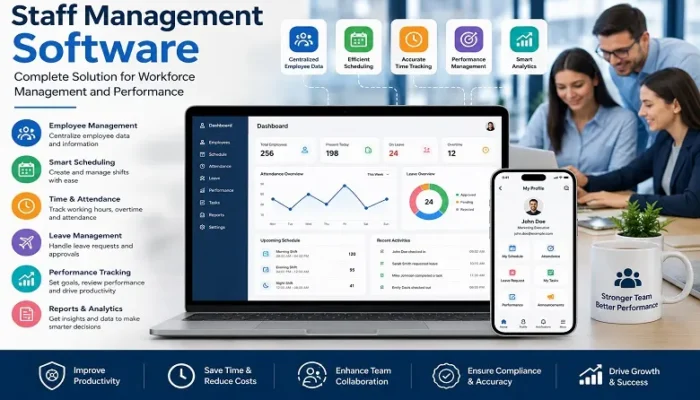
Managing a workforce efficiently requires more than keeping employee records. Businesses need to organize schedules, track attendance, manage leave, communicate with employees, monitor workloads, and understand performance. As teams grow, handling these responsibilities through spreadsheets, emails, and separate systems can become inefficient and error-prone.
Staff management software provides a centralized solution for organizing these workforce activities. Depending on the platform, businesses can manage employee information, scheduling, time tracking, attendance, leave, communication, tasks, and performance from a single system.
For organizations that rely on temporary workers, multiple shifts, or event-based teams, event staff management software offers specialized workforce tools. Businesses that want to improve employee development can also use staff performance management software to establish goals, provide feedback, conduct reviews, and measure progress.
Staff Management Software Explained
Staff management software is a digital workforce management solution that helps businesses organize and manage employees throughout the employment lifecycle.
The software can bring different workforce processes together, including:
- Employee profiles and records
- Staff scheduling
- Shift management
- Time and attendance
- Leave and absence management
- Employee communication
- Task assignment
- Performance tracking
- Reporting and analytics
- Payroll integration
Instead of maintaining separate spreadsheets for schedules, attendance, leave, and employee information, managers can use a centralized platform to access and update workforce data.
This can be particularly valuable for businesses with multiple departments, locations, shifts, or large numbers of employees.
Why Businesses Use Staff Management Software
Workforce administration can consume considerable management time when processes are performed manually.
A manager may need to create weekly schedules, check employee availability, approve leave, compare working hours, update attendance records, communicate shift changes, and prepare information for payroll.
When these activities are handled separately, several problems can occur:
- Duplicate data entry
- Scheduling conflicts
- Missed updates
- Inaccurate time records
- Poor visibility into employee availability
- Communication delays
- Difficulty tracking performance
Staff management software helps centralize these activities and gives managers a clearer view of their workforce.
The goal is not simply to automate administrative work. A well-designed system can also help managers make better decisions about staffing, productivity, scheduling, and employee development.
Core Features of Staff Management Software
The features available vary between platforms, but the following capabilities are commonly important when evaluating workforce management software.
Employee Records and Profiles
A centralized employee database provides managers with quick access to essential workforce information.
Employee profiles may include:
- Name and contact details
- Job title and department
- Employment information
- Skills and qualifications
- Certifications
- Work history
- Attendance information
- Leave records
- Performance information
- Relevant documents
Keeping this information in one system reduces the need to search through multiple files and makes employee administration more organized.
Staff Scheduling and Shift Planning
Scheduling is one of the most valuable functions of workforce management software.
Managers can create employee schedules, assign shifts, review availability, and make changes when business requirements change.
Depending on the platform, scheduling may take into account:
- Employee availability
- Skills
- Job roles
- Locations
- Working hours
- Overtime
- Shift preferences
- Minimum staffing requirements
Automated scheduling tools can also help identify potential conflicts before a schedule is published.
Time and Attendance Tracking
Accurate working-hour information is essential for payroll, compliance, labour-cost management, and workforce planning.
Staff management platforms can provide digital time tracking through web applications, mobile devices, time clocks, QR codes, or other supported methods.
Some solutions also offer location-based attendance features for employees who work outside a traditional office.
Accurate time records can help managers compare scheduled hours with actual working hours and identify attendance patterns or excessive overtime.
Leave and Absence Management
Managing leave through email or spreadsheets can make it difficult to understand team availability.
A staff management system can allow employees to submit leave requests digitally and managers to approve or reject them within the platform.
The system may also maintain records of:
- Vacation
- Sick leave
- Personal leave
- Approved absences
- Remaining leave balances
- Previous leave requests
This makes workforce planning easier because managers can see employee availability before creating schedules.
Employee Communication
Communication becomes more important as teams become larger or more distributed.
Many staff management platforms provide notifications, announcements, messages, reminders, or schedule updates.
Employees may be able to access their schedules, receive shift notifications, submit requests, and communicate with managers through a web or mobile interface.
Centralized communication can reduce dependence on scattered messages and help ensure that important workforce updates reach the right employees.
Task and Work Assignment
Some platforms also include task management features.
Managers can assign responsibilities to individual employees or teams, set deadlines, and monitor completion.
For example, a retail business could assign opening and closing tasks, while a hospitality company could assign cleaning, guest-service, or preparation responsibilities.
Task management becomes particularly useful when staff members need clear responsibilities during busy periods or large events.
Event Staff Management Software for Flexible Workforces
Event businesses have different staffing requirements from conventional office-based organizations.
A company organizing a conference, festival, wedding, exhibition, sporting event, or promotional campaign may need dozens or hundreds of workers for a limited period.
Staff requirements can also vary between events.
One event might require registration personnel and ushers, while another may require catering workers, security support, technicians, supervisors, and promotional staff.
Event staff management software helps organize these changing requirements through tools designed around events, shifts, roles, locations, and worker availability.
Event Staffing Workflow
A typical event staffing process can follow this structure:
Create Event → Define Roles → Set Shifts → Check Availability → Assign Staff → Publish Schedule → Track Attendance → Manage Changes → Review Hours
This creates a centralized workflow from planning through post-event administration.
For example, if an employee cancels shortly before an event, a manager can review available workers and assign an appropriate replacement rather than manually searching through messages or spreadsheets.
Important Event Staffing Features
Businesses looking for event-specific software should consider features such as:
Event-Based Scheduling
Managers should be able to create separate schedules for different events, dates, locations, and shifts.
Staff Availability
Employees can indicate when they are available, helping managers avoid assigning people to unsuitable shifts.
Role-Based Assignments
Different events require different skills. Software should make it possible to assign workers according to roles, qualifications, or experience.
Mobile Access
Event staff are often away from desks. Mobile access allows employees to view schedules, receive updates, check in, and communicate with supervisors.
Shift Changes and Replacements
Last-minute cancellations are common in event staffing. A useful platform should make it easy to find replacements and communicate schedule changes.
Attendance Tracking
Digital check-in and check-out can help event managers record actual working hours and improve payroll accuracy.
Staff Performance Management Software
Workforce management is not limited to scheduling and attendance. Businesses also need to understand how employees are performing and where they need additional support.
Staff performance management software provides tools for managing employee goals, reviews, feedback, development, and performance data.
Common capabilities include:
- Goal setting
- Performance reviews
- Continuous feedback
- Manager evaluations
- Employee self-assessments
- Key performance indicators
- Skills assessments
- Development plans
- Recognition
- Performance reports
Instead of relying solely on annual reviews, businesses can use structured performance information throughout the year.
Building a Strong Performance Management Process
Software is most effective when it supports a well-defined management process.
A practical performance cycle can include:
Set Goals → Monitor Progress → Provide Feedback → Review Results → Identify Development Needs → Set New Goals
For example, a sales employee might have targets for revenue, customer retention, and new accounts. A manager can review progress regularly rather than waiting until the end of the year.
For a customer-support employee, performance indicators might include response times, resolution rates, customer feedback, and quality scores.
The specific metrics should always reflect the employee’s actual role.
Staff Management and Performance Management Together
Staff management focuses primarily on workforce operations such as:
- Scheduling
- Attendance
- Leave
- Employee records
- Shifts
- Communication
- Time tracking
Performance management focuses on employee effectiveness and development, including:
- Goals
- Reviews
- Feedback
- Skills
- Development
- Performance metrics
Combining these functions can give managers a broader view of their workforce.
For example, attendance data may provide operational information, while performance reviews explain how an employee is progressing toward their goals. Neither type of information should automatically be treated as a complete measure of employee performance, but together they can support better management decisions.
Benefits of Staff Management Software
Reduced Administrative Work
Automating routine workforce processes can reduce the amount of time managers spend maintaining spreadsheets and manually updating records.
Better Workforce Visibility
Managers can quickly see schedules, availability, attendance, leave, and other workforce information from a centralized platform.
More Accurate Scheduling
Scheduling tools can help identify conflicts, manage availability, and allocate employees more efficiently.
Improved Employee Communication
Employees can receive schedules, reminders, announcements, and updates through a centralized system.
Better Attendance Records
Digital time tracking provides a more consistent record of working hours and can support payroll processing.
More Structured Performance Management
Performance tools can make goals, reviews, feedback, and development plans easier to organize.
Improved Labor Cost Control
Managers can analyze working hours, overtime, staffing levels, and other workforce data to identify potential inefficiencies.
Easier Workforce Scaling
A centralized system can become increasingly valuable as a business adds employees, departments, locations, or events.
Industries That Benefit from Staff Management Software
Staff management platforms can be useful across many industries.
Retail
Retail businesses can manage store schedules, employee availability, attendance, and shift coverage.
Hospitality
Hotels, restaurants, catering companies, and hospitality groups often require complex schedules and flexible staffing.
Healthcare
Healthcare organizations can use workforce systems to coordinate shifts, availability, attendance, and staffing requirements.
Construction
Construction companies can manage field workers, project assignments, working hours, and workforce information.
Education
Schools, training organizations, and educational businesses can use staff management systems for employee scheduling and administration.
Event Management
Event agencies can use specialized software to coordinate temporary workers, assignments, shifts, attendance, and last-minute replacements.
Professional Services
Consulting, marketing, technology, and professional-service organizations can use staff management tools to coordinate employees, tasks, schedules, and performance.
Staff Management Software Selection Criteria
The best platform depends on the organization’s size, workforce structure, industry, and specific requirements.
Before choosing software, businesses should evaluate the following areas.
Ease of Use
Managers and employees should be able to use the system without extensive training.
Mobile Functionality
A strong mobile experience is especially important for field workers, temporary staff, and event teams.
Scheduling Flexibility
The system should support the organization’s actual scheduling model, including rotating shifts, multiple locations, overtime, and last-minute changes where necessary.
Integration Capabilities
Integration with payroll, accounting, HR, project management, communication, or other systems can reduce duplicate data entry.
Reporting
Look for reports that provide useful information about attendance, overtime, labor costs, staffing, and performance.
Security
Employee information can be sensitive. Businesses should evaluate access controls, authentication, data protection, backups, and other security practices.
Scalability
A platform should be able to support the organization as it grows rather than forcing a complete system change after adding employees or locations.
Pricing Structure
Businesses should understand whether pricing is based on employees, users, modules, events, or other factors. The total cost should include implementation, integrations, training, and additional services where applicable.
Common Mistakes When Implementing Staff Management Software
Purchasing software is only one part of workforce digitization. Poor implementation can reduce its value.
Choosing Too Many Features
A platform with hundreds of features is not automatically better. Businesses should prioritize the tools they actually need.
Ignoring Employee Adoption
Employees need clear instructions and training. If workers find the system difficult to use, data quality may suffer.
Keeping Multiple Sources of Truth
Continuing to maintain separate spreadsheets after implementing a centralized system can create conflicting information.
Failing to Define Processes
Software works best when the business first establishes how scheduling, attendance, leave, approvals, and performance reviews should operate.
Neglecting Data Security
Employee information should be handled carefully, with appropriate access permissions and security controls.
The Role of Automation and AI
Automation is becoming an important part of modern workforce management.
Depending on the platform, automated tools can assist with schedule creation, employee notifications, attendance processing, reporting, workforce forecasting, and other repetitive tasks.
AI-powered features may also help identify staffing patterns or recommend schedules based on historical information and workforce requirements.
However, automation should support management decisions rather than remove human judgment completely.
Managers still need to consider employee skills, preferences, performance, workload, business priorities, and circumstances that software may not understand.
Staff Management Software for Growing Businesses
As a company grows, workforce management often becomes more complicated.
A small team may manage schedules through a shared spreadsheet. A larger organization may need separate processes for different departments, locations, shifts, and employee types.
Staff management software can provide a foundation for this growth by centralizing workforce information and standardizing common processes.
The most valuable systems are not necessarily the most complicated. They are the ones that make everyday workforce operations easier for managers while providing employees with a simple way to access the information they need.
Final Thoughts
Staff management software has become an important tool for organizations that want to simplify workforce administration and improve operational visibility. By bringing scheduling, attendance, leave, employee information, communication, and reporting into one platform, businesses can reduce manual work and create more consistent workforce processes.
For companies that manage conferences, festivals, hospitality teams, promotions, or temporary workers, event staff management software can make complex event staffing easier to coordinate.
Organizations focused on employee development can complement these tools with staff performance management software, using structured goals, feedback, reviews, and development plans to support better performance.
The right solution should ultimately match the way a business actually operates. Before choosing a platform, evaluate workforce size, scheduling complexity, employee types, mobile requirements, integrations, reporting, security, scalability, and total cost. A well-matched system can become more than an administrative tool—it can provide the workforce visibility needed to make smarter staffing and management decisions.
Frequently Asked Questions
A. Staff management software helps businesses organize employee information, scheduling, attendance, leave, communication, tasks, and other workforce activities through a centralized system.
A. Yes. Small businesses can use it to simplify scheduling, attendance, leave, employee records, and communication. The platform should be appropriately sized for the organization’s workforce and budget.
A. Staff management software generally focuses on workforce operations such as scheduling, attendance, leave, and employee records. Performance management software focuses on goals, reviews, feedback, development, and employee performance.
A. Event staff management software is designed around temporary and event-based staffing. It commonly emphasizes event scheduling, staff availability, role assignments, shift management, mobile communication, attendance, and replacement management.
A. Many platforms can integrate with payroll systems or export time and attendance information for payroll processing. Available integrations vary by provider.
A. Many modern platforms offer mobile applications or mobile-friendly interfaces. Employees may be able to view schedules, submit leave requests, receive notifications, communicate with managers, and record attendance.
A. Software does not automatically improve performance, but it can provide tools for setting goals, tracking progress, collecting feedback, and identifying development opportunities. Effective management practices remain essential.