


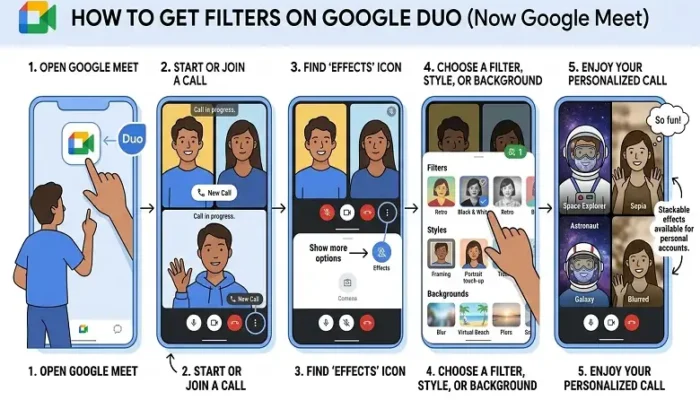
Video calling apps have evolved far beyond basic communication tools. People now expect interactive features that make conversations more fun, expressive, and visually engaging. Google Duo became one of the most popular videos calling apps because it introduced entertaining filters, augmented reality masks, animated effects, and video enhancements that worked smoothly even on regular smartphones.
The popularity of Google Duo filters increased rapidly because users could add funny masks, creative visual effects, and background enhancements during live calls or recorded video messages. These features made family calls, birthday greetings, holiday conversations, and casual chats feel more personal and interactive.
Even after Google merged Duo into Google Meet, many users still want to understand how to get filters on Google Duo and where those original Duo effects are available today. Most of the popular filters now work through Google Meet’s updated effects system, which includes AR masks, portrait enhancements, animated filters, and background effects for both Android and iPhone devices.
This guide explains everything about how to get filters on Google Duo, how the effects work, why filters sometimes disappear, and how Google Meet now supports many original Duo features.
What Are Google Duo Filters?
Google Duo filters are visual effects designed to improve the video calling experience with real-time animations, face masks, and camera enhancements. These filters use augmented reality technology and facial tracking systems to apply effects directly to the camera feed during video calls or video messages. Google introduced these features to make conversations feel more engaging instead of looking plain or repetitive.
The original Google Duo filters included animated glasses, funny face masks, cartoon effects, colour filters, background blur, and seasonal animations. Some filters were designed purely for entertainment, while others improved lighting and overall video appearance. These effects became especially popular because they worked smoothly on mobile devices without requiring advanced editing tools or complicated settings. Google first introduced filters for Duo video messages before expanding support for live calls and group conversations.
Google Duo and Google Meet Integration
One important reason many users struggle with how to get filters on Google Duo is the platform merger between Google Duo and Google Meet. Google officially combined both services into a single communication platform to simplify video calling and online meetings. After the transition, many original Duo features moved directly into Google Meet.
This change affected where filters appeared inside the app. Users who previously accessed filters through Google Duo began finding them under Google Meet’s effects menu instead. Google also expanded the feature set during the transition by adding more advanced portrait effects, AR masks, background enhancements, and lighting adjustments. Although the Duo name slowly disappeared, many of the original filters still exist inside Meet’s updated interface. The merger allowed Google to combine professional meeting tools with Duo’s casual and entertaining video effects system.
How to Get Filters on Google Duo
Understanding how to get filters on Google Duo starts with updating the app properly. Since most Duo features now work through Google Meet, users should install the latest version of Google Meet from the Play Store or App Store. Older versions may not support newer AR effects, animated masks, or portrait enhancements.
After updating the app, users can open Google Meet and start a video call with any contact. During the call, an effects icon or sparkle symbol usually appears on the screen. Tapping this button opens the visual effects menu, where users can browse different filters and animations. The available options may include AR face masks, animated overlays, background blur, beauty filters, and lighting enhancements. Once selected, the effect appears instantly during the conversation. Google continuously improves these visual tools through software updates and server-side feature rollouts.
Using Google Duo Filters for Video Messages
Google Duo originally became famous for its video message effects. Before live-call filters became common, users enjoyed recording short clips with creative animations and visual enhancements. This feature became especially popular during holidays, birthdays, and family celebrations because users could send personalized messages instead of simple text replies.
To use filters for video messages, users needed to open the app, swipe down from the home screen, record a short video, and select a filter before sending the clip. Google initially launched several exclusive effects specifically for this feature, including colourful animations, face masks, and seasonal overlays. These visual tools helped make video messages feel more social and entertaining. Even after the Google Meet transition, many users still associate Google Duo filters with the video messaging feature because it was one of the platform’s most recognizable additions.
Best Google Duo Filters and Effects
Several Google Duo filters became extremely popular because they balanced simplicity with creativity. Unlike heavily edited social media filters, Duo effects were lightweight, fast, and easy to use during live conversations. AR face masks became one of the most recognizable features because they tracked facial movement in real time and applied animated graphics directly to the face.
Popular examples included cartoon masks, space helmets, funny glasses, and animated animal effects. Background blur also became one of the most useful features because it helped remove distractions and improved privacy during calls. Google later expanded Meet’s effects library by adding portrait enhancements, studio lighting adjustments, and more advanced AR masks inspired by Duo’s original system. These additions helped transform Google Meet into both a professional meeting platform and a casual social communication app.
Why Google Duo Filters May Not Appear
Many users experience problems where filters disappear or fail to load properly. One of the most common reasons is using an outdated app version. Since Google continuously updates the effects system, older versions may not support newer animations or visual enhancements. Updating the app usually solves the issue immediately.
Device compatibility also affects filter availability. Older smartphones may lack the processing power required for advanced AR rendering and facial tracking. Some effects rely heavily on modern camera technology, which means low-end devices may show fewer filters or reduced animation quality. Regional rollout timing can also affect availability because Google often releases features gradually across different countries and devices. Workspace accounts sometimes experience restrictions as well because certain entertainment-focused effects may be limited for enterprise users.
How to Fix Google Duo Filters Not Working
If Google Duo filters stop working, several simple fixes can usually restore the feature quickly. Updating Google Meet to the newest version is the first and most important step because most compatibility issues happen on outdated software. Restarting the phone can also solve temporary rendering problems that affect AR animations and visual effects.
Clearing the app cache may improve performance as well, especially on Android devices where temporary files sometimes interfere with the effects system. Camera permissions should also be checked because filters require access to both the camera and microphone. If effects still fail to appear, reinstalling Google Meet often restores missing features and resets corrupted settings. Good lighting and a stable internet connection can also improve filter performance because facial tracking systems rely on clear visuals and smooth video transmission during calls.
Google Meet Effects vs Google Duo Filters
After the Duo and Meet merger, Google Meet became the main platform for video effects and AR filters. Many original Duo features continue to work through Meet, but Google also introduced several advanced additions that were not available in the old Duo app. Modern Meet effects now include portrait enhancements, studio-style lighting adjustments, AI-powered background blur, animated overlays, and enhanced AR masks.
Mobile devices generally support the most advanced effects because smartphones are optimized for real-time facial tracking and augmented reality rendering. Desktop versions of Google Meet usually focus more on practical tools like background blur and lighting adjustments instead of animated filters. Despite these differences, Google Meet still preserves much of the original Google Duo experience by keeping lightweight and entertaining visual effects available for casual users.
Are Google Duo Filters Safe to Use?
Google Duo filters and Google Meet effects are generally considered safe because they operate directly through Google’s official apps. Calls are encrypted, and visual effects are processed within the platform itself instead of relying on third-party software. This makes the system more secure compared to unofficial filter apps or modified APK files found online.
Users should avoid downloading external apps claiming to unlock extra Duo filters because these applications may compromise privacy or device security. The safest option is always using the official Google Meet app downloaded from trusted sources like the Play Store or Apple App Store. Keeping the app updated regularly also helps improve both security and filter performance because Google frequently patches bugs and optimizes visual processing systems through updates.
Final Thoughts
Google Duo helped popularize lightweight video filters and AR effects that made online conversations more entertaining and expressive. Even after Google merged Duo into Google Meet, many of the original features continue through Meet’s updated effects system. Users can still enjoy animated masks, portrait enhancements, background blur, and creative video filters during calls on Android and iPhone devices.
Understanding how to get filters on Google Duo now mainly involves using Google Meet’s modern effects interface, where Google continues expanding visual features and AR capabilities. With regular updates and improved camera enhancements, the platform remains one of the most versatile options for both professional meetings and casual video conversations.
Frequently Asked Questions
A. Yes, many original Google Duo filters now work through Google Meet after Google merged both platforms into a unified communication app.
A. Users can get filters on Google Duo by updating Google Meet, starting a video call, and opening the effects menu during the conversation.
A. Filters may disappear because of outdated app versions, unsupported devices, regional rollouts, or Workspace account restrictions.
A. Yes, Google Meet and former Duo filters are available free of charge for standard users.
A. Yes, most filters and AR masks work in real time during active video conversations.