


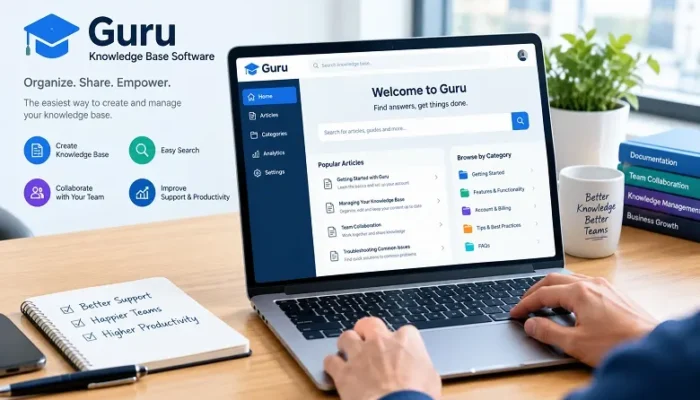
Businesses generate valuable information every day, including internal procedures, customer support answers, product documentation, sales resources, and employee guidelines. When this information is scattered across emails, shared drives, and workplace conversations, finding the correct answer can become time-consuming. Guru knowledge base software addresses this challenge by helping organizations organize information, verify important content, and make knowledge easier for employees to access.
Guru is a knowledge management platform designed to connect company information with the tools employees already use. It combines structured documentation, enterprise search, integrations, and AI-powered answers to help teams find reliable information without constantly switching between applications.
For organizations with growing teams, maintaining accurate internal knowledge is important for employee onboarding, customer support, sales operations, and everyday decision-making. This guide explains how Guru works, its main features, business applications, advantages, limitations, and what to consider before adopting the platform.
What Is Guru Knowledge Base Software?
Guru knowledge base software is an AI-powered knowledge management platform that helps businesses capture, organize, maintain, and distribute internal information. It provides a central knowledge layer where employees can access company resources and find answers to work-related questions.
Rather than functioning only as a traditional document repository, Guru connects information from different business applications and makes it searchable through its knowledge platform.
For example, a customer support representative may need to check a refund policy while responding to a customer. Instead of searching through several folders or asking a manager, the employee can use Guru to find relevant information.
The platform organizes knowledge through structured content, including Cards and Collections, and supports integrations with tools such as Slack, Microsoft Teams, Google Drive, and Salesforce.
Guru also uses AI capabilities to provide answers based on available company information. Its focus is on making organizational knowledge easier to discover, maintain, and use in everyday workflows.
Read Also: Staff Management Software: Complete Guide to Workforce Management and Performance
How Does Guru Knowledge Base Software Work?
Guru connects business information from different sources and organizes it into a searchable knowledge environment. Employees can create documentation directly within the platform or connect existing information sources.
The platform uses structured knowledge content, integrations, and search capabilities to help users locate relevant information. Its AI-powered Knowledge Agents can also respond to questions using connected knowledge sources, with citations and permission controls.
For example, a technology company might use Guru to organize product documentation, troubleshooting instructions, onboarding materials, and internal policies. Support employees can access relevant information while handling customer requests, while sales teams can use approved product information during conversations with prospects.
This approach helps reduce dependence on individual employees as the only source of important company knowledge.
Key Features of Guru Knowledge Base Software
Guru offers several features designed to improve knowledge organization, accuracy, and accessibility. The following capabilities are particularly relevant to businesses managing large amounts of internal information.
1. Knowledge Cards and Collections
Guru uses Cards to organize individual pieces of company knowledge. These can contain instructions, policies, product information, frequently asked questions, and other useful resources.
Collections provide a way to group related Cards into organized sections. Businesses can create different collections for departments, projects, products, or internal processes.
This structure helps employees find relevant information without navigating through unrelated documents.
2. AI-Powered Search and Answers
Finding information across multiple applications can be challenging, particularly for employees working in large organizations.
Guru uses AI-powered search and Knowledge Agents to help users retrieve relevant information from connected sources. Employees can ask questions in natural language and receive answers based on accessible company knowledge.
The platform also provides source citations, allowing users to review the information behind an answer. This is important when employees need to verify policies, procedures, or other business-critical details.
3. Knowledge Verification and Updates
Outdated documentation can create confusion and lead to incorrect decisions. Guru addresses this problem through knowledge verification and maintenance workflows.
Organizations can assign content owners and establish review processes to check whether information remains accurate. Guru also provides automated verification capabilities that use content signals and configured rules to help identify information requiring attention.
This is particularly useful for frequently changing information, such as product instructions, pricing guidelines, and customer support policies.
4. Integrations With Business Applications
Guru connects with various workplace applications, allowing employees to access relevant information without relying on a single standalone knowledge repository.
Its integrations include tools such as Slack, Microsoft Teams, Google Drive, Confluence, SharePoint, and Salesforce.
These connections help organizations bring information from existing systems into a more unified knowledge environment. Access permissions remain important, especially when connected sources contain confidential business information.
5. Browser Extension and Knowledge Access
Guru offers a browser extension that helps employees access relevant company information while working online.
This can be useful for customer support representatives, sales professionals, and other employees who regularly switch between applications. Instead of opening a separate knowledge repository for every question, users can access relevant information within their working environment.
6. Access Controls and Security
Businesses need to control who can view, edit, and manage internal information. Guru provides permission management and administrative controls to support this requirement.
Its platform documentation describes features such as role-based permissions, single sign-on, SCIM, audit logs, and permission-aware knowledge access. Specific security and compliance capabilities may depend on the subscription and configuration.
Organizations should review the current security documentation before connecting sensitive business information.
Read Also: Develop Oxzep7 Software: A Practical Guide for Modern Development
Benefits of Using Guru for Knowledge Management
A structured knowledge management system can help businesses reduce information gaps and improve how employees access internal resources.
Faster Access to Business Information
Employees often spend time searching through documents, messages, and shared folders to find answers. Guru helps organize information and makes it easier to retrieve relevant knowledge through search and connected applications.
More Consistent Customer Support
Support teams need accurate answers when handling customer questions. A centralized knowledge environment helps employees refer to approved procedures, product information, and support guidelines.
This can reduce inconsistent responses and unnecessary internal enquiries.
Easier Employee Onboarding
New employees need access to company policies, job responsibilities, training materials, and operational procedures. Guru can help organize these resources into accessible knowledge collections.
This gives new team members a structured starting point and reduces the need to repeatedly request basic information from colleagues.
Better Collaboration Across Departments
Different departments often depend on information created by other teams. Guru can help make relevant knowledge available across sales, marketing, support, HR, and operations, subject to access permissions.
This improves information sharing and reduces unnecessary communication gaps.
Reduced Knowledge Loss
When experienced employees leave an organization, important knowledge can disappear if it exists only in their personal notes or conversations.
Documenting processes and maintaining shared knowledge resources helps businesses preserve important operational information and make it accessible to other authorized employees.
Who Can Benefit From Guru Knowledge Base Software?
Guru is particularly relevant to organizations that need reliable internal information across multiple departments.
- Customer support teams: Can access troubleshooting guides, product instructions, and approved customer response information.
- Sales departments: Can organize product details, sales playbooks, pricing information, and frequently asked questions.
- Human resources teams: Can maintain employee policies, onboarding resources, and internal procedures.
- Marketing teams: Can organize brand guidelines, campaign information, content processes, and messaging resources.
- IT and operations teams: Can maintain technical documentation, internal procedures, and troubleshooting instructions.
- Growing businesses: Can establish consistent knowledge-sharing practices as teams and operational requirements expand.
The platform is most useful when employees regularly need information that is otherwise spread across several workplace applications.
Guru vs. Traditional Knowledge Base Software
Traditional knowledge base systems generally focus on storing and organizing documentation. Guru extends this approach by combining structured knowledge with enterprise search, integrations, verification, and AI-powered answers.
| Area | Traditional knowledge base | Guru |
| Information organization | Pages, articles, and documents | Cards, Collections, and connected sources |
| Knowledge discovery | Search and navigation | Search and AI-powered answers |
| Content maintenance | Often relies on manual reviews | Supports verification and automated maintenance |
| Integrations | Depends on the platform | Connects with multiple workplace applications |
| Knowledge delivery | Usually through a dedicated interface | Also supports access through connected workflows |
| AI capabilities | Varies by product | Includes Knowledge Agents and AI-powered search |
The right choice depends on the organization’s requirements. A traditional documentation platform may be sufficient for businesses that primarily need an internal wiki. Guru may be more suitable for teams that want to connect knowledge across different applications and make verified information accessible within daily workflows.
How to Implement Guru Successfully
Choosing knowledge management software is only the first step. Businesses also need a clear process for creating, organizing, and maintaining information.
Identify important knowledge: Start by listing the information employees frequently need, such as company policies, product documentation, customer support procedures, and onboarding instructions.
Organize information into categories: Create a logical structure for departments, projects, and business processes. Use clear names so employees can locate information easily.
Assign content owners: Make specific employees responsible for reviewing and updating important knowledge resources.
Connect relevant applications: Integrate the business tools that contain useful information, while checking permissions and access requirements.
Train employees: Explain how to search for information, contribute documentation, and report outdated content.
Review performance: Monitor search activity, unanswered questions, content usage, and verification requirements to identify areas that need improvement.
A consistent approach helps prevent the knowledge base from becoming another collection of outdated documents.
Limitations to Consider Before Choosing Guru
Guru offers a range of knowledge management and AI features, but it may not be the right solution for every organization.
First, businesses need to invest time in organizing existing information and establishing content ownership. Connecting multiple sources without reviewing their quality can make it harder to identify accurate information.
Second, organizations should evaluate the platform’s pricing and available features against their team size and requirements. Enterprise-focused capabilities may be more than a small business needs.
Finally, Guru should not automatically be treated as a replacement for every document management, project management, or customer-facing help center application. Its strongest use case is organizing and delivering trusted internal knowledge.
A product demonstration or trial, where available, can help businesses evaluate whether the platform fits their existing workflows.
Frequently Asked Questions
A. Guru is used to organize, verify, and distribute internal business knowledge. It helps employees find company information, access documentation, and receive AI-powered answers through connected workplace applications.
A. Yes. Guru is a knowledge management platform that combines structured documentation, enterprise search, integrations, content verification, and AI-powered knowledge discovery.
A. Yes. Guru provides AI-powered search and Knowledge Agents that can answer questions using connected company information. Answers can include citations so employees can review their sources.
A. Yes. Guru supports integrations with Slack and Microsoft Teams, allowing employees to access knowledge and AI-powered answers within these communication environments.
A. It can be useful for small businesses with significant internal documentation or recurring knowledge-sharing requirements. However, smaller teams should compare its capabilities and pricing with simpler documentation solutions before making a decision.
A. Guru supports verification workflows, content ownership, automated maintenance, and review processes. These capabilities help organizations identify information that may need updating or archiving.
A. It can serve as an internal knowledge platform, but whether it replaces an existing wiki depends on the organization’s documentation requirements, content structure, integrations, and preferred workflows.
Conclusion
Guru knowledge base software provides businesses with a structured way to organize, verify, and access internal information. By combining Knowledge Cards, Collections, enterprise search, integrations, and AI-powered Knowledge Agents, it helps employees find relevant information without depending entirely on scattered documents and workplace conversations.
Its capabilities can be particularly valuable for customer support, sales, HR, and operations teams that regularly need accurate information to complete their work.
Before adopting Guru, businesses should evaluate their knowledge management requirements, review available integrations, establish content ownership, and consider the platform’s overall cost. With proper implementation and regular maintenance, Guru can become an important part of an organization’s knowledge-sharing and productivity strategy.