


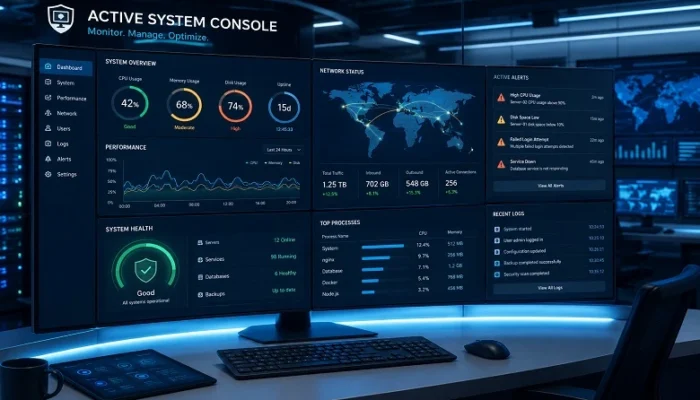
Active system console solutions have become an essential part of modern IT infrastructure, helping organizations monitor, manage, and optimize complex systems from a single interface. As businesses increasingly rely on servers, cloud platforms, databases, applications, and network devices, maintaining visibility across the entire environment is more important than ever.
Managing each system separately is both time-consuming and inefficient. A centralized console provides real-time insights into system health, performance, and critical alerts, enabling IT teams to identify issues early and minimize downtime before they impact business operations.
In this guide, you’ll learn what an active system console is, how it works, its key features, benefits, practical use cases, and the best practices for choosing the right solution for your organization.
What Is an Active System Console?
An active system console is a centralized management platform that helps IT teams monitor, manage, and maintain infrastructure from one interface. It continuously collects data from servers, applications, databases, cloud resources, and network devices, providing real-time visibility into system health and performance.
Rather than checking individual systems manually, administrators can monitor the entire environment through a single dashboard. Most platforms also include alerting, reporting, automation, and remote management features, making it easier to identify issues, reduce downtime, and improve operational efficiency.
Why Is an Active System Console Important?
Modern IT environments are often spread across on-premises infrastructure, cloud platforms, and remote locations. Without centralized monitoring, troubleshooting becomes slower, and small issues can escalate before they’re noticed.
An active system console solves this challenge by consolidating operational data into one place. This allows IT teams to identify performance bottlenecks, monitor critical services, and respond to incidents faster. The result is improved system availability, reduced maintenance time, and a more reliable IT infrastructure.
How Does an Active System Console Work?
An active system console gathers operational data from connected systems using monitoring agents, APIs, system logs, and network protocols. The information is analyzed continuously and displayed through dashboards that highlight system status, resource usage, and active alerts.
When predefined thresholds are exceeded—such as high CPU usage, low disk space, or a failed service—the console automatically generates notifications. Many platforms can also trigger automated actions, helping administrators resolve common issues without manual intervention.
Key Features of an Active System Console
The exact capabilities vary between platforms, but most modern active system console solutions share several core features that help simplify IT operations.
Real-Time System Monitoring
Continuous monitoring allows administrators to track the health and performance of infrastructure as it changes. Instead of waiting for users to report problems, IT teams can identify abnormal behavior immediately.
Common metrics include:
- CPU and memory usage
- Disk utilization
- Network traffic
- Server uptime
- Application status
- Database performance
Centralized Dashboard
A centralized dashboard brings together information from multiple systems into one interface. This eliminates the need to switch between different monitoring tools and provides a clear overview of the entire IT environment.
Typical dashboard widgets include:
- Infrastructure health
- Active alerts
- Performance graphs
- Resource utilization
- Service availability
- Recent system events
Intelligent Alerts
One of the most valuable features of an active system console is its alerting system. Instead of constantly checking dashboards, administrators receive notifications whenever predefined conditions are met.
Alerts can be triggered for events such as:
- High CPU utilization
- Low storage space
- Network failures
- Service interruptions
- Hardware errors
- Security incidents
Most platforms support email, SMS, mobile notifications, and integrations with collaboration tools like Slack or Microsoft Teams.
Remote Administration
Many solutions allow administrators to perform routine management tasks without physically accessing a server.
Depending on the platform, remote capabilities may include:
- Restarting services
- Running maintenance scripts
- Rebooting systems
- Managing configurations
- Deploying updates
This improves response times, especially in distributed or hybrid environments.
Reporting and Analytics
Historical data helps organizations understand how their infrastructure performs over time.
Built-in reporting tools can reveal:
- Resource usage trends
- Capacity growth
- Recurring system issues
- Service availability
- Infrastructure performance
These insights support better planning and long-term decision-making.
Automation
Modern IT teams spend considerable time on repetitive maintenance tasks. Many active system console platforms reduce this workload through automation.
Examples include:
- Restarting failed services
- Clearing temporary files
- Creating incident tickets
- Running scheduled scripts
- Scaling cloud resources
Automation improves efficiency while reducing the risk of human error.
Benefits of Using an Active System Console
Organizations of all sizes benefit from centralized monitoring. Beyond improving visibility, an active system console helps maintain stable, reliable, and secure IT operations.
Faster Issue Detection
Continuous monitoring helps identify problems before they become major outages. Early detection allows administrators to resolve issues quickly and minimize business disruption.
Reduced Downtime
Automatic alerts and real-time visibility enable faster troubleshooting, helping maintain high service availability and reducing costly downtime.
Improved Operational Efficiency
Managing infrastructure from a single dashboard saves time and eliminates the need to work across multiple monitoring tools.
Better Resource Management
Performance data makes it easier to identify overloaded servers, unused resources, storage limitations, and network bottlenecks. This helps organizations optimize infrastructure and control operating costs.
Enhanced Security Monitoring
Many platforms collect logs from servers, firewalls, and network devices, making it easier to detect suspicious activity and investigate security incidents.
Simplified Compliance
Centralized logging and reporting support compliance with industry standards by maintaining audit trails and system activity records.
Common Use Cases
An active system console is useful across a wide range of IT environments. Here are some of the most common applications.
Enterprise IT Infrastructure
Large organizations use centralized monitoring to oversee hundreds or even thousands of servers, workstations, and network devices from a single platform.
Cloud Infrastructure
Businesses running workloads on AWS, Microsoft Azure, or Google Cloud can monitor cloud resources alongside on-premises infrastructure.
Data Centers
Data center operators rely on real-time monitoring to maintain server health, storage performance, and network availability.
Managed Service Providers (MSPs)
MSPs use centralized consoles to monitor multiple client environments, respond to incidents, and deliver proactive support.
DevOps Teams
Development and operations teams use monitoring data to improve application performance, identify deployment issues, and maintain service reliability.
Industries That Benefit Most
Although almost every organization relies on IT infrastructure, some industries benefit particularly from centralized monitoring.
- Healthcare
- Banking and financial services
- Manufacturing
- Retail and eCommerce
- Government agencies
- Educational institutions
- Telecommunications
- SaaS companies
- Logistics and transportation
For these organizations, maintaining system availability is essential for both business continuity and customer satisfaction.
How to Choose the Right Active System Console
Choosing the right active system console depends on your organization’s infrastructure, budget, and operational requirements. While every platform offers different capabilities, the best solution should provide reliable monitoring, simple management, and room to grow with your business.
When comparing solutions, consider the following factors:
Scalability
Your monitoring platform should support future growth without requiring a complete replacement. As your infrastructure expands, adding new servers, applications, or cloud resources should be straightforward.
Multi-Platform Support
Modern IT environments rarely rely on a single operating system or cloud provider. Look for a solution that supports:
- Windows and Linux servers
- Virtual machines
- Public cloud platforms
- Network devices
- Databases
- Enterprise applications
Customizable Dashboards
Every organization has different monitoring priorities. A customizable dashboard allows administrators to display the metrics and alerts that matter most.
Intelligent Alerting
An effective alerting system helps IT teams respond quickly while avoiding unnecessary notifications. Choose a platform that supports custom thresholds, alert priorities, and multiple notification channels.
Reporting and Analytics
Historical reports make it easier to identify performance trends, plan infrastructure upgrades, and troubleshoot recurring issues. Built-in analytics can also support capacity planning and business reporting.
Best Practices for Using an Active System Console
Deploying an active system console is only the first step. Following a few best practices can help maximize its effectiveness and improve long-term system reliability.
Monitor Critical Systems First
Start by monitoring business-critical servers, applications, and network devices. Once the platform is fully configured, gradually expand monitoring across the rest of your infrastructure.
Configure Meaningful Alerts
Avoid creating alerts for every minor event. Instead, focus on conditions that require immediate attention, such as service failures, resource exhaustion, or security-related incidents.
Review Performance Reports Regularly
Historical data often reveals gradual performance changes that aren’t obvious during daily monitoring. Reviewing reports helps identify recurring issues before they become major problems.
Keep the Console Updated
Regular software updates improve security, add new features, and ensure compatibility with the latest operating systems and cloud services.
Automate Routine Tasks
Use automation wherever possible to reduce repetitive work. Simple tasks such as restarting failed services or clearing temporary files can often be handled automatically, allowing administrators to focus on more complex issues.
Common Challenges
Although an active system console offers significant advantages, organizations may encounter a few challenges during implementation.
Common issues include:
- Complex initial configuration
- Integration with legacy systems
- Poorly configured alerts
- Large volumes of monitoring data
- Staff training requirements
These challenges are usually manageable with proper planning and a phased deployment approach.
Future Trends
As IT environments continue to evolve, monitoring platforms are becoming smarter and more automated. Modern active system console solutions increasingly incorporate artificial intelligence and predictive analytics to help administrators resolve issues before they impact users.
Emerging trends include:
- AI-powered anomaly detection
- Predictive maintenance
- Automated incident response
- Root cause analysis
- Hybrid and multi-cloud monitoring
- Container and Kubernetes monitoring
- Advanced security analytics
These capabilities help organizations shift from reactive troubleshooting to proactive infrastructure management.
Frequently Asked Questions
A. An active system console is a centralized platform that monitors, manages, and reports on the health and performance of IT infrastructure, including servers, applications, cloud resources, databases, and network devices.
A. No. Businesses of all sizes can benefit from centralized monitoring. Small and medium-sized organizations often use these platforms to improve system visibility and reduce downtime as their infrastructure grows.
A. Yes. Many platforms collect security logs, monitor unusual activity, and generate alerts for suspicious events, helping IT teams respond more quickly to potential threats.
A. Most modern solutions are designed for hybrid infrastructure and support leading cloud providers such as AWS, Microsoft Azure, and Google Cloud Platform.
A. The biggest advantage is centralized visibility. IT teams can monitor their entire infrastructure from one interface, allowing them to detect issues earlier, reduce downtime, and improve operational efficiency.
Conclusion
As IT infrastructure becomes more distributed and complex, centralized monitoring is no longer a convenience—it’s a necessity. An active system console gives organizations a single, reliable view of their servers, applications, networks, cloud resources, and other critical systems, making it easier to maintain performance and respond to issues quickly.
Beyond real-time monitoring, the right platform helps automate routine tasks, improve resource utilization, strengthen security, and support informed decision-making through detailed reporting and analytics. Whether you’re managing a small business network or a large enterprise environment, investing in a robust active system console can simplify day-to-day operations while improving the overall reliability of your IT infrastructure.
By selecting a solution that matches your organization’s needs and following proven monitoring best practices, you’ll be better equipped to minimize downtime, optimize performance, and build a more resilient technology environment for the future.